
Real Estate Site Visit Confirmation Workflow: Don't Drive Until the Buyer Confirms
Treat a site visit as unconfirmed until the buyer replies. Use four visit states, one clear message, and a named owner so agents do not leave the office for a silent calendar slot.
Quick answer
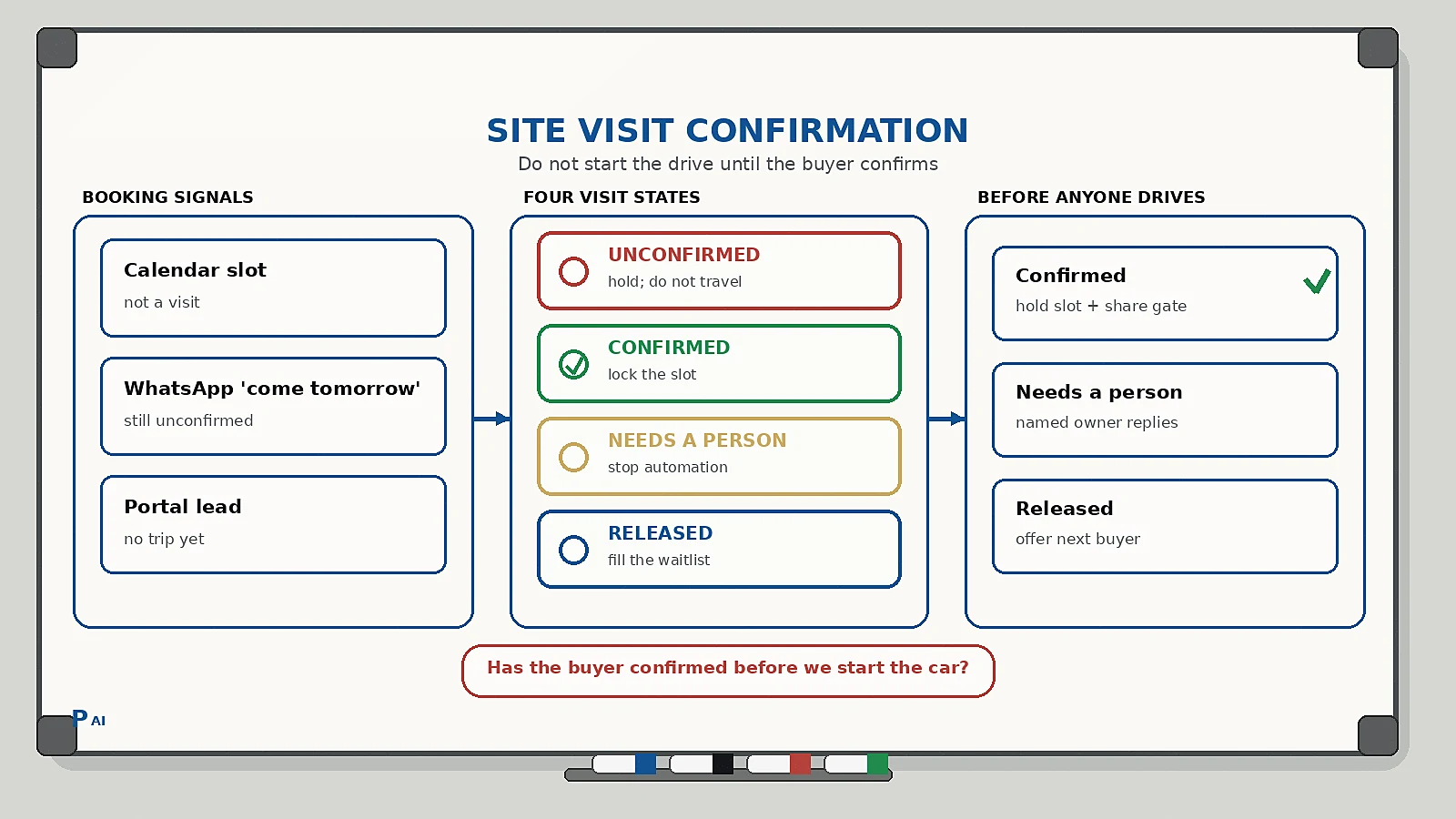
A real estate site visit confirmation workflow is the operating rule that holds a viewing until the buyer confirms they still want it, the time is usable, and the right people will actually arrive. The workflow should do four things: tag the visit as unconfirmed, send one clear confirmation request, retry once if there is no reply, and stop automation when the buyer changes the time, adds a co-buyer, or does not answer.
Do not treat a portal lead, a WhatsApp “come tomorrow,” or a calendar block as a visit. A site visit is a trip. Confirm the trip before an agent, a seller, or a site team waits at the gate.
Why confirmation is an operations problem, not a CRM feature
Most brokerages already know the pattern. The diary looks full. The agent still leaves early to beat traffic. The buyer does not pick up. Security will not let anyone in without a name. The seller waited. The next serious buyer could have had that slot.
The failure is not “we need more reminder templates.” The failure is missing ownership between booking and travel:
- Nobody named is allowed to hold or release the slot.
- The confirmation message also asks for budget, a brochure download, and a review.
- “Running late” is treated as a confirmed arrival.
- Unconfirmed family visits occupy the same diary as a locked seller appointment.
This is related to, but not the same as, real estate lead routing. Routing decides who owns the inquiry. Confirmation decides whether anyone should leave the office. Clinics have a close cousin in appointment reminders. Restaurants have one in reservation confirmation. Real estate adds drive time, gate access, co-buyers, and a seller or site team who cannot be “waitlisted” the same way a table can.
The four states every site visit should have
Keep the states visible on the CRM, the WhatsApp inbox, and the agent’s day sheet. If the agent cannot see the state on the phone before starting the car, the workflow is decorative.
| State | Meaning | What may happen next |
|---|---|---|
| Unconfirmed | Visit created; buyer has not verified date, time, project, and who is coming | Send the first confirmation request; do not treat the slot as locked for other buyers |
| Confirmed | Buyer accepted time, project, and the arrival window you stated | Hold the slot; stop reminder retries; share gate or meeting-point details |
| Needs a person | Time change, extra visitors, finance question, seller access issue, or “call me” | Named owner replies; automation stops |
| Released | Buyer cancelled, or no usable reply after the retry window | Free the slot; offer it to the next qualified buyer for that inventory |
Two rules keep this honest:
- Confirmed facts and open questions stay separate. “Buyer asked if 5:30 is possible” is not “visit at 5:30.”
- Only a named owner can move a visit from Needs a person back to Confirmed.
This is the same design as a human-in-the-loop AI workflow: automation handles the routine path; a person owns judgement.
What the first confirmation message should contain
One message. One job. The buyer should recognize the visit and answer without opening a brochure pack.
Include:
- Agent or brokerage name.
- Project or property, in the language the buyer used (not an internal project code).
- Date and time, in local phrasing (tomorrow 4:30 pm, not a raw timestamp).
- Meeting point: gate, sales office, or unit number.
- Who is expected to come, if you already have that on file.
- One question: confirm, change the time, or cancel.
Do not mix this with a price list, a new launch, or a request for a Google review. Extra asks raise the chance the buyer ignores the only question that protects the diary.
A useful reply set is three options, not eight:
- Confirm
- Change time
- Cancel
Anything else — co-buyer joining, loan query, “send the layout again,” seller not available, “who is this?” — should route to a person. If the same buyer later repeats those details to a different agent, you have a customer context handoff problem, not a reminder problem.
A practical sequence a small sales team can run
Use clock time relative to travel, not a generic “24 hours before” for every visit.
- At booking. Send the confirmation immediately. Same-day visits may only need this one message plus a last check before travel.
- If there is no reply. Retry once, closer to the visit. For a next-day afternoon slot, a useful second touch is the evening before or the morning of, not another message five minutes later.
- If the buyer confirms. Mark Confirmed. Stop retries. Then send the practical details that only matter after a yes: map pin, parking, gate name, what to bring.
- If the buyer changes time or who is coming. Move to Needs a person. An agent checks seller access, inventory availability, and travel time, then replies with a yes, a nearby slot, or a decline. Automation does not invent a visit.
- If there is still no usable reply. Apply the house rule you already stated. For a Sunday inventory with a waiting list, that often means Released in time to offer the slot. For a quiet weekday two-person visit on a nearby project, holding until the last hour may be cheaper than chasing.
Name the owner before the day starts. “Whoever is on WhatsApp” is not an owner. The agent assigned to that inventory, or the floor manager for that project, is.
The hard rule: do not start the drive while the visit is still Unconfirmed, unless a person explicitly accepts the risk. Confirmation is cheap. An empty site visit is not.
Gate access and seller time are part of confirmation
A restaurant can sometimes fill a released table from a waitlist in the room. A site visit usually cannot. Someone else is already moving:
- A seller who blocked the afternoon.
- Security who needs a name and vehicle number.
- A site engineer who agreed to open a sample unit.
- A second agent who was going to handle overflow.
When the visit is Confirmed, send those people a short internal note: buyer name, time, meeting point, vehicle if needed. When it moves to Released, tell them immediately. Leaving the seller standing is how you lose the next listing, not just one viewing.
Do not put seller phone numbers in the buyer-facing message unless that is an explicit house rule. The confirmation channel is for the buyer. Internal coordination stays internal.
Waitlist fill is part of confirmation, not a separate campaign
A confirmation workflow that never frees a slot is only half-built. When a visit moves to Released, the next action should already exist:
- Who is next for that project, configuration, and time window.
- What message they get (one offer, one expiry).
- How long they have to accept before the offer moves on.
- Who may give the slot to a walk-in at the site office.
Do not blast every lead who ever asked about the project. That creates three “yes” replies for one sample unit and a new operations mess. Offer in order. Expire the offer. Then move to the next name.
What should never be automated
Keep these with a person, even if the first message was automatic:
- Price, discount, or “lowest you can do” replies.
- Home loan, eligibility, or legal document questions.
- Seller or landlord access problems.
- Visits with more people than the gate will allow.
- Angry or confused replies, including “I already cancelled.”
- Any request that would change another buyer’s slot.
Voice still matters when the buyer will not type. A missed call that created the original visit should still land in an owned queue — see missed call automation for small businesses — but the visit state lives on the diary, not in the call recording.
How to know the workflow is working
Do not start with a revenue dashboard. Start with states a sales manager can count at the end of the day:
- Share of visits that reached Confirmed before the agent left.
- Share still Unconfirmed at the travel cutoff.
- How often Needs a person waited more than 15 minutes for a reply.
- How many Released slots were offered to the next buyer in time to use the inventory.
- How often a “confirmed” party arrived with different people than the diary.
If unconfirmed weekend visits still fill the diary, the messages are not the bottleneck. The hold rule is.
Implementation checklist
- Every site visit has one of four states on a surface the agent can see before travel.
- The first message states project, time, meeting point, and three reply options.
- Retries stop after one follow-up or after the buyer confirms.
- Time changes, extra visitors, pricing, and complaints route to a named person.
- Released slots have a next-buyer offer order and an expiry.
- Gate, seller, and site-team notes update when the state changes.
- Context from WhatsApp, phone, and the CRM stays with the visit, not in a private chat.
FAQ
Should every brokerage confirm every site visit?
No. A walk from the site office to a sample unit on a quiet Tuesday may not justify a chase. Use confirmation where a no-show actually costs travel, seller time, or a slot another buyer wanted: weekend inventory, far sites, gated projects, and days that already turn other buyers away.
Is WhatsApp required?
No. Use the channel buyers already reply on. WhatsApp is common for property teams in India and many other markets, but SMS or a short call can carry the same four states. The channel is not the workflow.
When should we call instead of messaging?
When there is no usable reply before the travel cutoff, when the buyer asked to be called, or when access depends on a person who will not read a chat in time. A call still has to update the same four states. Otherwise the next agent will trust a silent calendar.
What if the buyer confirms and still does not arrive?
That is a no-show after confirmation, not a failed reminder. Apply the wait window you stated, offer the slot if you still can, and record the outcome on the buyer record so the next visit is not treated as a first-time unknown.
If you want this designed as a live sales workflow — states, message copy, next-buyer order, and the human exception path — contact Pratap AI Innovations. We implement WhatsApp and voice automation for real estate, clinics, and service teams that need the diary to stay honest before anyone travels.
