
WhatsApp Document Collection Workflow: Stop Chasing Files Before Work Can Start
A yes is not a start. Request one missing list, store each file on the customer record, ask once for unreadable photos, and let a person own IDs, contracts, and disputes.
Quick answer
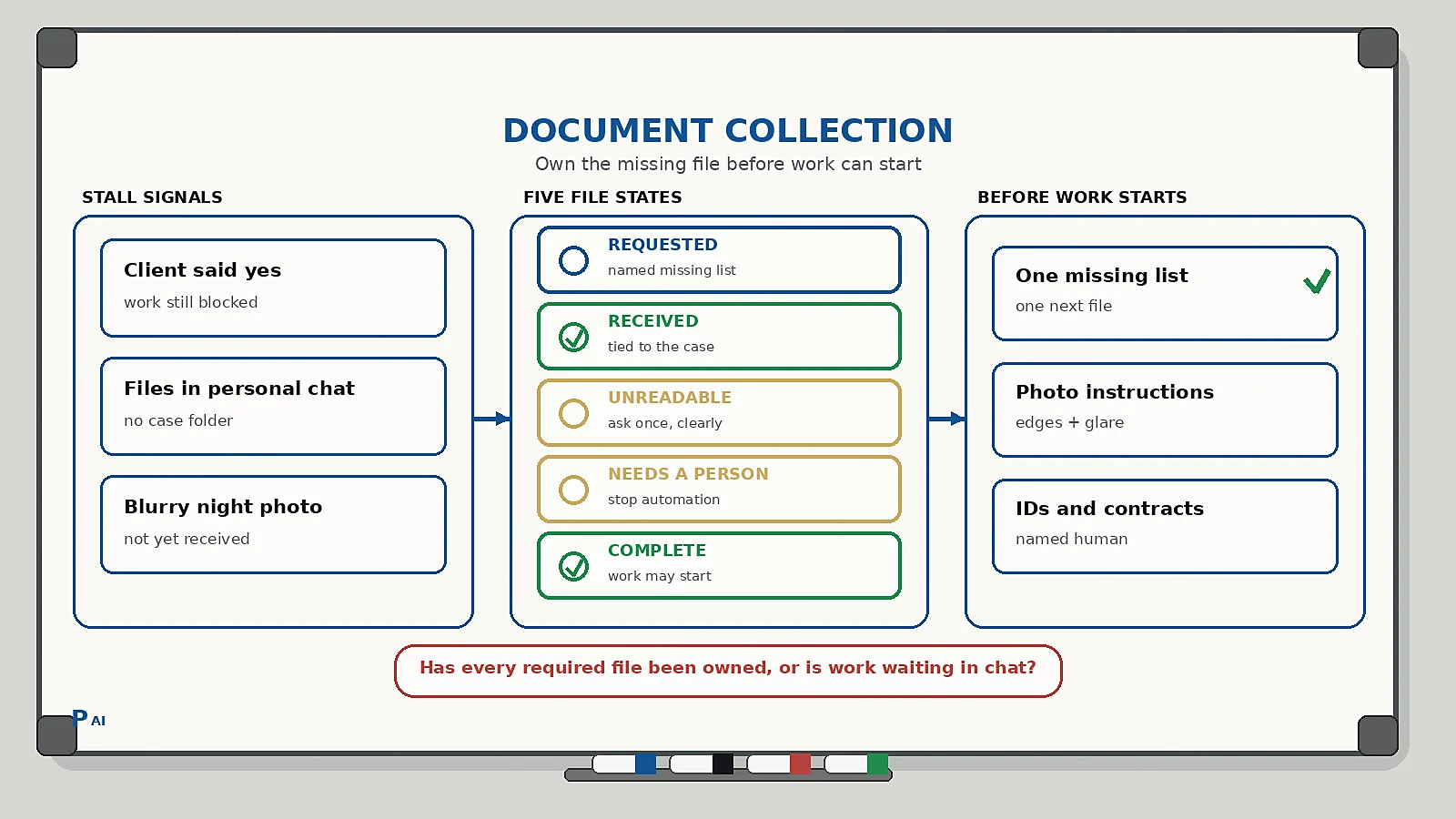
A WhatsApp document collection workflow is the operating rule that owns every required file before work, a visit, or an account can start. The workflow should do five things: publish a short missing list, request one next file at a time, store each attachment on the customer record, ask once when a photo is unreadable, and hand IDs, contracts, and disputes to a named person.
Do not treat a chat full of screenshots as a file cabinet. “Please send docs” is not a state. Work should start only when the list is Complete, not when someone said they would send it later.
Why files stall after the client says yes
Most service teams already have a client onboarding checklist. That covers the first 30 days. It does not own the two days after a yes, when the job is blocked because PAN, Form 16, a cancelled cheque, a GST certificate, or a clinic consent form is still in someone’s personal chat.
What usually happens next:
- The founder asks for “all documents” in one message.
- The client sends three blurry night photos and a PDF of the wrong year.
- A coordinator re-asks from a different number, so the client starts a second thread.
- Readable files live in WhatsApp, not on the customer record.
- Sensitive IDs sit in a group with people who do not need them.
This is related to, but not the same as, WhatsApp-to-CRM. Capture decides whether the person exists in the system. Document collection decides whether work is allowed to start. Keep both on one record so a reminder does not land on a client who already uploaded, or who is already in a support dispute. That is the same design as customer context handoffs.
Vendor pages in this space often sell a bot that “collects everything automatically.” The useful part is timing and a missing list. The dangerous part is treating an unreadable Aadhaar photo, a contract, or a medical form as a solved upload.
The five states every required file should have
Keep the state visible on the case, in the WhatsApp inbox, and to whoever is allowed to start work. If the person sending the reminder cannot see what is still missing, the workflow is decorative.
| State | Meaning | What may happen next |
|---|---|---|
| Requested | The file is on the missing list | Send one next-file ask |
| Received | A file is stored on this case | Check readability; do not start work yet |
| Unreadable | Cropped, dark, wrong side, or wrong year | One recapture ask with photo rules |
| Needs a person | ID mismatch, legal document, medical, or a dispute | Named owner replies; automation stops |
| Complete | Every required item is readable and stored | Work, visit, or account may start |
Two rules keep this honest:
- A screenshot in chat is not Received. Only a file stored on the customer record counts.
- Only a named owner can move a file from Needs a person to Complete, or close the case because the client will not send it.
This is the same design as a human-in-the-loop AI workflow: automation handles timing; a person owns judgement.
What the first request should contain
One case. One thread. The client should know what is missing and how to send it without calling the founder.
Include:
- Business name they already agreed to work with.
- Case or job name in their words (“ITR FY 2025-26”, “clinic file for Arjun”, “GST registration”).
- The missing list, short enough to read on a phone.
- One next file, not twelve. Ask for the item that unblocks the rest.
- How to photograph it: all four edges, no flash glare, both sides if needed, PDF preferred when they already have one.
- How to say “I do not have this” so a missing original is captured instead of becoming a week of silence.
Do not mix this with a review request, an upsell, or a payment reminder. Extra asks raise the chance they ignore the only action that starts the work.
A useful reply set is four options, not a paragraph:
- Sending now
- Sending today evening
- I do not have this
- Talk to a person
Write every reply back onto the case. If they say they do not have Form 16, that is a state change, not another “please send docs.”
How to handle unreadable files without starting a fight
Most delays are not refusals. They are photos taken at night, cropped Aadhaar numbers, password-locked PDFs, or last year’s statement.
For Unreadable:
- Name the problem in one line (“the bottom edge is cut”, “the back side is missing”, “the PDF will not open”).
- Ask for one recapture, with the same photo rules.
- Stop after one recapture ask in that window. A second identical ping is spam.
- If the second file is still unusable, move to Needs a person.
Do not auto-approve identity documents, signed contracts, or clinical forms because a bot scored them as “looks like Aadhaar.” A person should open those files.
Implementation checklist
Run this on one service line for two weeks before you add more document types.
- Write the required list for that service. If you cannot name the files, you cannot automate the chase.
- Put source, owner, case, missing list, and next action on the CRM record.
- Open one WhatsApp thread per case. Do not collect from the founder’s personal chat.
- Send the first request the same day the client says yes.
- Time one reminder inside a short window (for example next morning), then stop unless they reply.
- Store files under the case, not in a shared downloads folder named by date.
- Route IDs, contracts, medical forms, and angry replies to a named human.
- Do not start billable work, a site visit, or an account until the list is Complete — or a named owner has waived a specific item in writing.
- When the list is complete, tell the client what happens next and who owns it.
- Review exceptions once a week: recapture loops, files that never arrive, and cases that started anyway.
FAQ
What is a WhatsApp document collection workflow? It is the rule that turns “please send documents” into named file states, one next ask, storage on the customer record, and a human stop for sensitive or disputed files.
Should a chatbot collect KYC documents on its own? It can request and remind. It should not mark identity, legal, or medical files complete without a person opening them.
How many reminders should we send? One first request and one reminder in a short window is enough for most cases. After that, a named owner should decide whether to wait, waive, or close.
Where should the files live? On the customer or case record your team already uses, with access limited to people who need them. A WhatsApp thread is a capture channel, not the archive.
What if the client sends everything in one dump? Accept the dump, split it onto the missing list, mark what is readable, and ask only for what is still wrong or missing.
If your team is still chasing PAN cards and consent forms from a personal WhatsApp, start with this workflow on one service line. When you want help designing the states, owner, and stop rule, talk to Pratap AI.
