
WhatsApp Invoice Payment Reminder Workflow: Get Paid Without Becoming Collections
Treat an unpaid invoice as an owned state, not a personal chase. Use five statuses, one payment path, and a stop rule so WhatsApp reminders collect cash without burning the client.
Quick answer
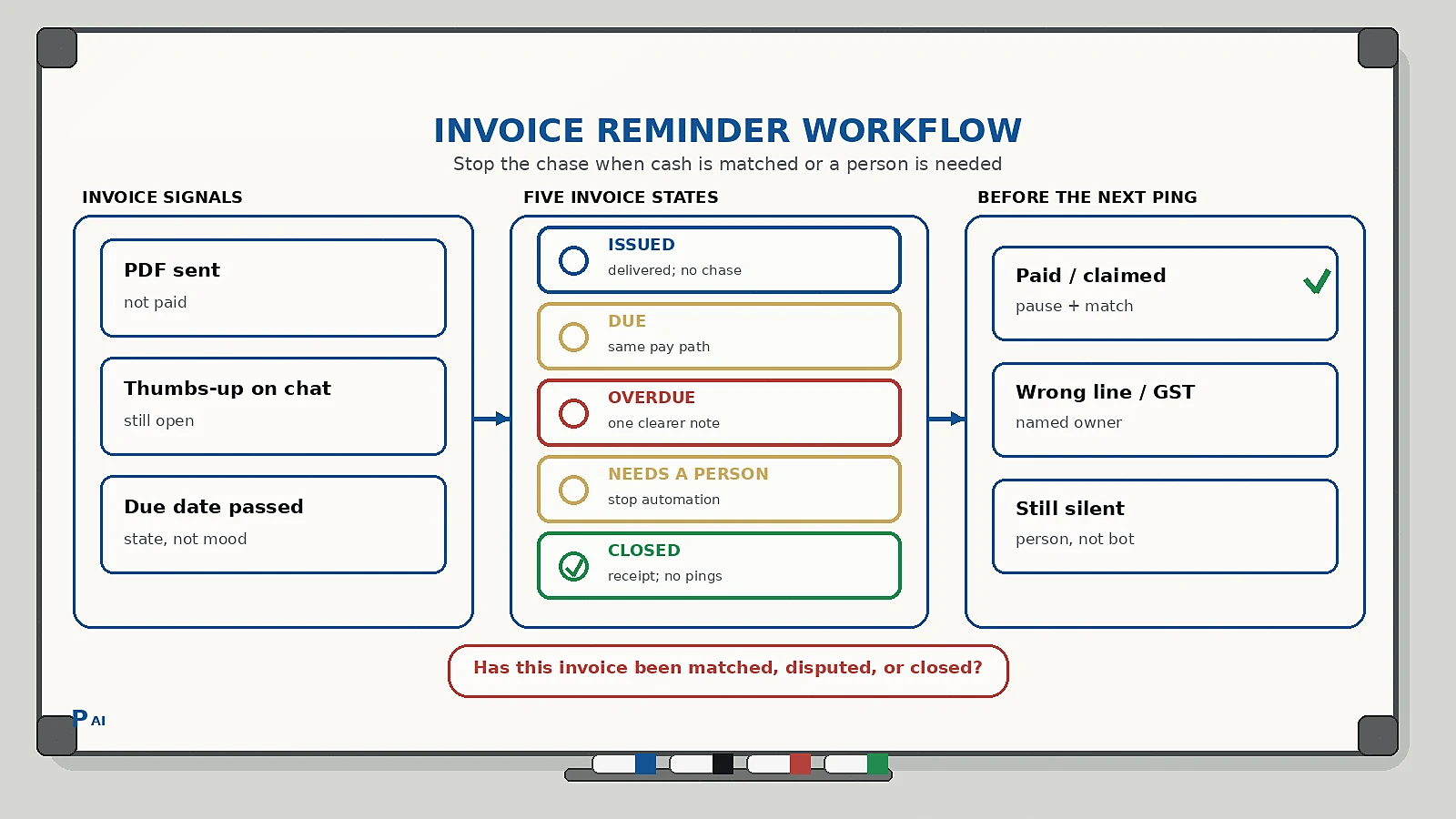
A WhatsApp invoice payment reminder workflow is the operating rule that moves an invoice from sent to paid without turning the founder into a daily collections desk. The workflow should do five things: tag the invoice with a visible state, deliver the bill once with a working payment path, send a small number of stage-matched reminders, pause the moment payment or a dispute appears, and hand exceptions to a named person.
Do not treat “I forwarded the PDF last week” as a collections system. An invoice is not paid because it left your inbox. It is paid when money is matched to that invoice number and the reminder sequence stops.
Why chasing invoices on WhatsApp fails
Most agencies, clinics, studios, and home-service firms already send the bill on WhatsApp. The PDF goes out. A thumbs-up arrives. Then silence. The founder waits three days, writes a slightly more awkward message, waits again, and starts resenting a client who may simply have missed the due date.
The failure is rarely “we need funnier templates.” The failure is missing ownership between issue and cash:
- The invoice lives in accounting software, while the chase lives in a personal chat.
- The same paragraph is sent four times, so it reads as nagging even when the amount is fair.
- A client who already paid still gets the overdue note because nobody stopped the sequence.
- A dispute (“this extra line is wrong”) is treated as non-payment instead of a blocked invoice.
- Nobody named is allowed to pause work, offer a date, or write off a small balance.
This is related to, but not the same as, WhatsApp-to-CRM lead capture. Lead capture decides who owns the inquiry. Payment reminders decide who owns the money already earned. Keep both on one customer record so a collections message does not land on a client who is already mid-complaint in another thread. That is the same design as customer context handoffs.
The five states every invoice should have
Keep the state visible in the CRM, the WhatsApp inbox, and the accounting tool. If the person sending the reminder cannot see the state before they tap send, the workflow is decorative.
| State | Meaning | What may happen next |
|---|---|---|
| Issued | Invoice created and delivered; due date is in the future | No chase yet; optional pre-due heads-up |
| Due | Due date has arrived; no payment matched | Send the due-day reminder with the same payment path |
| Overdue | Past due; no dispute logged | Send the next stage-matched reminder; do not invent a new story |
| Needs a person | Client asked a question, disputed a line, promised a date, or payment failed | Named owner replies; automation stops |
| Closed | Paid, credited, or written off | Stop every reminder; send a receipt if paid |
Two rules keep this honest:
- A thumbs-up on the PDF is not Closed. Only a matched payment, credit note, or explicit write-off closes the invoice.
- Only a named owner can move an invoice from Needs a person back to Due or Overdue.
This is the same design as a human-in-the-loop AI workflow: automation handles timing; a person owns judgement.
What the first invoice message should contain
One invoice. One thread. The client should recognize the work and be able to pay without hunting through email.
Include:
- Company name the client already used.
- What the invoice is for, in their words (not an internal job code).
- Invoice number and amount due.
- Due date in local phrasing (15 Sep, not a raw timestamp).
- One payment path that actually works (UPI link, payment page, or bank details you already use).
- How to say “already paid” or “this line looks wrong.”
Do not mix this with a new upsell, a review request, or a brochure. Extra asks raise the chance the client ignores the only action that clears the balance.
A useful reply set is four options, not eight:
- Pay now
- Already paid
- Need a correction
- Need a later date
If the client picks a later date, log the promise and move the invoice to Needs a person. A promised date is not cash.
A practical reminder sequence
Keep the sequence short. Stage-match the message. Never send the identical paragraph twice.
- Issue day. Deliver the invoice and the payment path. Confirm the thread: “Invoice 1042 for the September retainers is in this chat.”
- Three days before due. Friendly heads-up. Repeat invoice number, amount, due date, and the same payment path. Offer to resend the PDF.
- Due day. Neutral reminder. No apology theatre and no threat language. Ask them to reply if they already paid.
- A few days overdue. One clearer note. Invite a correction or a date. This is where many invoices are actually blocked by a wrong GST line, a missing PO, or a finance queue — not by unwillingness.
- Second overdue, then a person. If there is still no payment and no usable reply, stop the bot. A named owner calls or writes a specific next step: pause the next sprint, hold the next delivery, or agree a date.
What you never do:
- Escalate tone in public-looking language (“final legal notice”) unless that is a real, approved process.
- Stack email, SMS, and WhatsApp with three different amounts for the same invoice.
- Keep reminding after a payment screenshot until accounts has matched it. Put it in Needs a person with “payment claimed” instead.
Accounting software should own due dates. A spreadsheet of “people I should ping” will drift the first week someone is travelling.
When automation must stop
Automation is allowed to time the reminder. It is not allowed to argue.
Stop the sequence and assign a named owner when any of these appear:
- The client says the amount, tax line, or scope is wrong.
- The client says they already paid, or sends a screenshot.
- Payment fails (expired link, wrong UPI, bank rejection).
- The client asks to split the bill or pay after a milestone you did not invoice that way.
- The client is also in an active delivery or support dispute.
- The amount is large enough that a wrong reminder would damage the account.
The owner’s job is narrow: confirm the facts, fix the invoice if needed, match the payment, or set one agreed date. Then either Closed or a new due date with a fresh, shorter sequence.
Implementation checklist
Use this as a one-week build, not a six-month finance transformation.
- Pick the source of truth for invoice number, amount, due date, and paid/unpaid. Usually that is the accounting tool, not WhatsApp.
- Map each open invoice to one customer record and one WhatsApp number. If two chats exist, merge them before the first reminder.
- Add the five states above to the record the team actually looks at.
- Write four short message templates (issue, pre-due, due, first overdue). Keep variables to name, invoice number, amount, due date, and payment path.
- Define the stop events: paid, disputed, payment claimed, failed payment, “call me.”
- Name the human who owns Needs a person invoices each day. A shared inbox with no owner is how overdue bills sit for a month.
- Send a receipt or “we have matched payment” note when the invoice closes. That ending is part of the system, not a courtesy.
- Review the overdue list twice a week. If the same invoice is still Overdue after the second reminder, it is a people problem, not a missing template.
Common pitfalls
- Chasing from a personal number. When the founder’s chat is the ledger, nobody else can continue the sequence on a leave day.
- New amount, same invoice. If you correct a line, issue the revised invoice and reset the sequence. Do not remind against a number the client no longer owes.
- Reminder without a pay path. “Please pay invoice 1042” with no link or account detail forces the client to hunt. Many will not.
- Treating silence as insult. Silence is often a finance queue, a missing PO, or a PDF they never opened. The due-day message should make paying easier than explaining.
- No pause after “paid.” One reminder after settlement can undo months of goodwill. Prefer a short delay while accounts matches, then a receipt.
FAQ
Is it professional to send invoice reminders on WhatsApp?
Yes, if the client already uses WhatsApp with you for delivery and billing, the message is specific, and you stop when they pay or dispute. A vague daily ping is what feels unprofessional.
How many reminders should I send?
Enough to cover issue, pre-due, due day, and one overdue note. After that, a person should decide. Repeating the same line does not create urgency; it creates mute.
What if the client says they already paid?
Move the invoice to Needs a person, ask for the reference or screenshot, and pause reminders until accounts matches or rejects the claim. Do not keep the overdue sequence running “just in case.”
Should reminders go out automatically?
Timing can be automatic. Matching payment, correcting invoices, and deciding to pause work should not be. Connect reminders to invoice status, not to a calendar alarm that cannot see cash.
Do I need the WhatsApp Business API on day one?
No. Start with states, templates, and a named owner. Official API automation helps when volume makes manual sending the bottleneck. A messy process on an API is still a messy process.
Practical takeaway
Unpaid invoices are usually an operations gap: no state, no stop rule, and no owner. Put every open bill in one of five states, send a short stage-matched WhatsApp sequence with one payment path, and let a person handle disputes and claimed payments. The point is not to sound tougher. The point is to get matched cash without training clients to ignore you.
If you want help designing a WhatsApp billing reminder that sits on the same customer record as delivery and support, talk to Pratap AI Innovations.
