
NDR Recovery Workflow: Own the Failed Delivery Before It Becomes RTO
A failed delivery is not automatically RTO. Tag the attempt, message the customer the same day with two usable next steps, write address changes back to the order, and let a person own refusals.
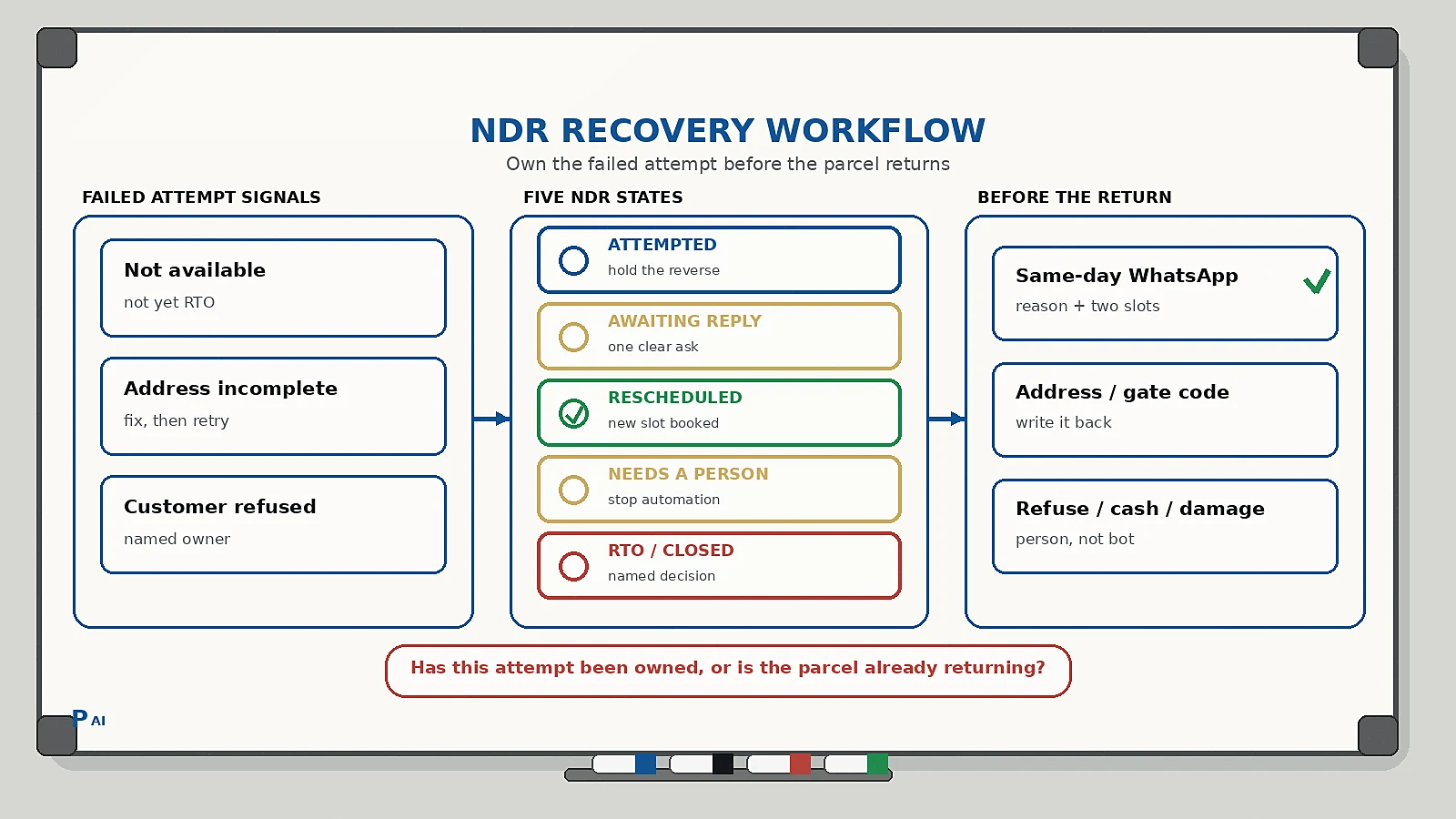
Quick answer
An NDR recovery workflow is the operating rule that owns a failed delivery attempt before the parcel is sent back. The workflow should do five things: record the attempt with a visible state, tell the customer what failed in plain language, offer two next steps they can actually take, write any address or slot change back onto the order, and hand refusals, cash problems, and damage to a named person.
Do not treat the courier remark as the last word. “Customer not available” is a state, not a return. RTO should be a named decision after the recovery window, not the default because nobody replied in the warehouse WhatsApp group.
Why failed deliveries become silent returns
Most D2C and marketplace sellers already confirm COD orders before packing. That stops fake intent. It does not save the order that was real, packed, and then missed at the door.
What usually happens next:
- The courier marks NDR (not delivered / non-delivery report).
- The warehouse waits for a second attempt with no customer message.
- The customer learns the parcel “is returning” only after the reverse pickup is already moving.
- Address typos, society gate codes, and “come after 7” live in a rider’s notes, not on the order.
- A refusal, a COD cash shortfall, or a damaged box is treated like another “not available.”
This is related to, but not the same as, COD order confirmation. Confirmation decides whether you should ship. NDR recovery decides whether a shipped order still has a path to the door. Keep both on one customer record so a recovery ping does not land on someone who already cancelled, or who is already in a support thread. That is the same design as customer context handoffs.
The five states every failed attempt should have
Keep the state visible on the order, in the WhatsApp inbox, and to whoever talks to the courier. If the person sending the message cannot see the state before they tap send, the workflow is decorative.
| State | Meaning | What may happen next |
|---|---|---|
| Attempted | Courier tried; parcel is still with the network | Hold reverse movement; send the recovery message |
| Awaiting reply | Customer has been told; no usable next step yet | One follow-up inside the recovery window |
| Rescheduled | New slot or corrected address is on the order | Notify courier; stop nagging |
| Needs a person | Refusal, cash issue, damage, abuse, or a VIP | Named owner replies; automation stops |
| Closed | Delivered on retry, cancelled by customer, or RTO approved | Stop every ping; record the reason |
Two rules keep this honest:
- A courier code is not Closed. Only a successful retry, an explicit customer cancel, or a named RTO decision closes the attempt.
- Only a named owner can move an order from Needs a person to Rescheduled or Closed.
This is the same design as a human-in-the-loop AI workflow: automation handles timing; a person owns judgement.
What the first recovery message should contain
One order. One thread. The customer should know what failed and what to do without calling the rider.
Include:
- Brand name they already ordered from.
- Order number and what is in the parcel, in their words.
- What the attempt meant in plain language (“we could not complete delivery today”).
- The reason you actually have (not available, address incomplete, gate closed) — do not invent a story the courier did not log.
- Two next steps, not eight: a later slot today/tomorrow, or “update address / landmark.”
- How to say “I no longer want this” so a refusal is captured instead of becoming a surprise RTO.
Do not mix this with a review request, a coupon, or a COD-to-prepaid lecture. Extra asks raise the chance they ignore the only action that saves the trip.
A useful reply set is four options, not a paragraph:
- Deliver later today
- Deliver tomorrow
- Address / gate needs a fix
- Cancel this order
If they pick a slot, write it on the order and tell them the courier will use that window. A thumbs-up is not a slot.
A practical recovery sequence
Keep the sequence short. Stage-match the message. Never send the identical paragraph twice.
- Minutes after NDR, not next morning. Send the recovery note while the parcel is still local. Overnight silence is how “not available” becomes a return.
- If they pick a slot. Move to Rescheduled. Confirm the window in the same chat. Push the new instruction to the courier or 3PL, not only to your inbox.
- If they send an address or landmark. Capture it on the order. Repeat the corrected line back. Do not trust a rider screenshot as the system of record.
- If they stay silent. One follow-up inside the recovery window you actually have with the courier (often the same day or next morning). Repeat order number and the two slots. Do not stack SMS, email, and WhatsApp with three different times.
- End of window, then a person or a close. If there is still no usable reply, a named owner decides: one last attempt, customer cancel, or RTO. The bot does not “just return it.”
What you never do:
- Auto-RTO because the first ping had no reply in twenty minutes.
- Keep offering slots after the customer said cancel.
- Ask them to “call the rider” with no number and no order context.
- Treat every NDR code as “not available.” Refusal, address, cash, and damage are different jobs.
The courier network owns scan events. Your order record should own the customer decision. A spreadsheet of “people to call after failed deliveries” will drift the first week someone is travelling.
When automation must stop
Automation is allowed to time the recovery note. It is not allowed to argue, discount, or promise a refund.
Stop the sequence and assign a named owner when any of these appear:
- The customer refuses the parcel or says the product is wrong.
- COD cash, UPI at the door, or a payment mismatch.
- Damage, open box, or “this is not what I ordered.”
- Abuse, legal language, or a public complaint in the same thread.
- The customer is already in a support triage or invoice dispute.
- The order value or account is large enough that a wrong ping would damage the relationship.
The owner’s job is narrow: confirm the facts, correct the address or slot, approve a retry, accept the cancel, or send the parcel back. Then Closed, with a reason the warehouse can act on.
If money is already involved — prepaid refund, partial COD, or a claimed payment — pause recovery chatter and treat it as a billing exception, not another delivery ping. That boundary is the same as the invoice reminder stop rule: claimed money needs a person.
Implementation checklist
Use this as a one-week build, not a six-month logistics transformation.
- Pick the source of truth for order number, address, COD/prepaid, and delivery status. Usually that is the order system or 3PL dashboard, not WhatsApp.
- Map each open shipment to one customer record and one WhatsApp number. If two chats exist, merge them before the first recovery note.
- Add the five states above to the record the team actually looks at.
- Write three short templates (first NDR, silent follow-up, reschedule confirmation). Keep variables to name, order number, reason, and two slots.
- Define the stop events: slot chosen, address updated, cancel, refuse, damage, cash issue, “call me.”
- Name the human who owns Needs a person NDRs each day. A shared inbox with no owner is how reverse pickups start themselves.
- Write the new slot or address back to the courier instruction. A WhatsApp yes that never reaches the rider is theatre.
- Review open Attempted and Awaiting reply orders twice a day during dispatch hours. If the same order is still waiting after the recovery window, it is a people problem, not a missing template.
Common pitfalls
- Confirming intent, then ignoring the attempt. COD confirmation before ship does not replace recovery after a failed knock.
- One generic “please be available” blast. If the reason was a missing wing or a locked society, availability is the wrong ask.
- Rider notes that never hit the order. Gate codes and “after 8 pm” die when the rider changes.
- Too many choices. Eight buttons freeze people. Two slots plus “fix address” plus “cancel” is enough.
- RTO with no recorded reason. You cannot improve the next week if every return is labelled “customer.”
FAQ
What is an NDR in delivery operations?
NDR means the courier could not complete delivery and logged a non-delivery report. Typical reasons include customer not available, incomplete address, refused shipment, or a payment issue at the door. It is an attempt outcome, not an automatic return.
Should I message the customer on WhatsApp after every failed attempt?
Yes, if they already buy from you on WhatsApp or SMS, the note is specific to that order, and you stop when they reschedule, cancel, or escalate. A vague daily ping is what feels like spam.
How is this different from COD confirmation?
COD confirmation happens before the parcel leaves you, to test whether the order is still wanted. NDR recovery happens after an attempt fails, to save a shipment that is already in the network. Run both, on the same customer record.
How many recovery messages should I send?
One same-day note and at most one follow-up inside the courier’s retry window. After that, a person should decide retry, cancel, or RTO. Repeating the same line does not create a slot.
Do I need the WhatsApp Business API on day one?
No. Start with states, templates, and a named owner. Official API automation helps when volume makes manual sending the bottleneck. A messy process on an API is still a messy process.
Practical takeaway
Failed deliveries are usually an ownership gap: no state, no same-day ask, and no write-back to the courier. Put every open NDR in one of five states, send a short WhatsApp with two usable next steps, and let a person own refusals and money issues. The point is not to sound more urgent. The point is to decide the parcel’s next move before the reverse trip starts itself.
If you want help designing an NDR recovery path that sits on the same customer record as confirmation and support, talk to Pratap AI Innovations.
