
WhatsApp Appointment Reschedule Workflow: Move the Slot, Don't Duplicate It
A reschedule is not a new booking with a polite tone. It is the operating rule that moves one existing slot on one record — on WhatsApp, on the calendar, and on the board — without leaving a ghost appointment that still sends reminders.
Quick answer
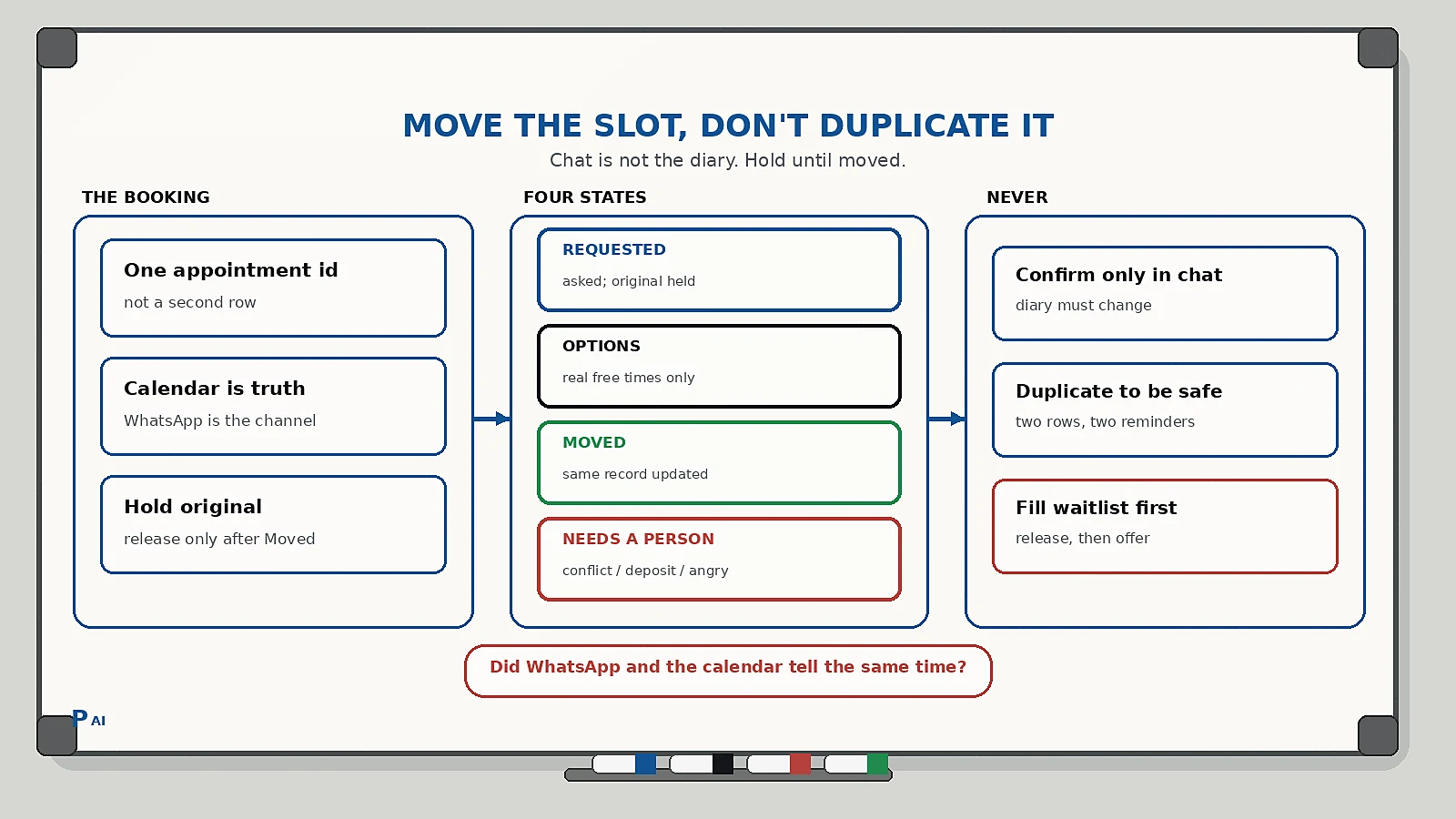
A WhatsApp appointment reschedule workflow is the operating rule that moves an existing booking instead of creating a second one. Do four things: keep one appointment record after the customer asks to move, offer only times that are actually free on the calendar, write the new time onto that same record, and let a named person own double-books, deposits, angry replies, or anything the calendar cannot honour.
Most "we thought you were coming" fights are not rude customers. They are two records for one visit: the old slot still live, the new chat looking booked, and a reminder still firing at the time nobody intends to use.
Why reschedules create ghost appointments
You already confirmed the visit. Then the customer replies "can we do Thursday?" Someone types yes in WhatsApp. The original calendar row is still there. Tomorrow the reminder goes out for Wednesday. The technician still has Wednesday on the board. Thursday is either empty or double-booked.
What usually goes wrong:
- The chat agrees to a new time. The calendar does not.
- Staff create a second booking and leave the first one "just in case."
- The bot offers times that look free in a spreadsheet and are already taken in the diary.
- A deposit, prep work, or a named technician is attached to the old slot and never moved.
- Waitlist fills start before the original slot is actually released, so two customers think they own the same hour.
This sits between a visit confirmation and no-show recovery. Confirmation answers "is this slot real." Reschedule answers "which slot is real now." No-show recovery starts only after the start time has passed and the chair is empty. Do not run all three as the same message.
Clinic reminder sequences are a cousin, not a duplicate. A clinic appointment reminder is there to keep tomorrow's slot. This workflow is what happens when the customer is trying to leave that slot.
The four states of a reschedule
Keep a visible state on the appointment record, in the customer WhatsApp thread, and on the calendar the team actually works from. If the person sending the message cannot see the state before they tap send, the workflow is decorative.
| State | Meaning | What the customer gets |
|---|---|---|
| Requested | They asked to move; original slot still held | Short ack: we have the request, original time is held until we confirm the new one |
| Options offered | Real free slots, from the calendar, for this service and this person | Two or three real times, not an open "whenever" |
| Moved | Same record updated; old slot released | New confirmation with date, time, who they will see, and how to change again |
| Needs a person | Conflict, deposit, named staff, anger, medical, legal | Named owner replies; bot stops offering times |
Two rules keep it honest:
- Requested is not Moved. A WhatsApp "Thursday works" is a request until the calendar row has changed.
- Only a named owner moves a record to Needs a person. The bot never invents a slot, never waives a deposit, and never deletes a booking because the chat felt urgent.
This is the same discipline as a human-in-the-loop AI workflow: automation handles the timing of true states; a person owns the judgement when the diary cannot keep the promise.
What each customer message should contain
One appointment. One thread. No essay, no fake "any time this week."
Include:
- The customer's name, your business name, and which booking this is ("cleaning, Wednesday 2pm with Anita").
- The current state in plain language: we have your request, here are real options, you are moved, or a person will reply.
- Two or three times that are free for this service, this duration, and this staff member if the job is named.
- One easy reply set: those times, "none of these," or "keep the original."
- What happens to the old slot: it stays held until Moved, then it is released.
A useful reply set is short:
- Time 1 / Time 2 / Time 3
- Keep Wednesday
- None of these — talk to a person
If they choose Keep Wednesday, that is not a failure. Update the record to confirmed-again and stop the reschedule sequence. If they choose None of these, that is Needs a person, not a reason for the bot to invent Friday at 7pm.
The next person who opens the thread should see the same booking the customer sees. That is the same lesson as customer context handoffs.
A practical reschedule sequence
Keep the sequence stage-matched. The bot is allowed to speak when the request is real and the calendar can honour an option. It is not allowed to narrate hope.
- Ack the request, hold the original. One line: we have it, the current slot stays yours until we confirm a move. Do not release Wednesday because someone typed "maybe Thursday."
- Offer only real options. Pull times from the calendar that match duration, room, and named staff. If you cannot see the diary, do not automate the offer.
- Move the same record. Change the existing appointment. Do not create a second row and hope someone deletes the first. Then send the new confirmation.
- Release, then fill. Only after Moved is true may you offer the old slot to a waitlist. Filling first is how you get two customers for one chair.
- If the diary cannot honour it. Stop offering. A named owner handles overlap, deposits, prep already started, or an angry "you promised."
What you never do:
- Confirm a new time only in chat.
- Create a duplicate booking "so we don't lose them."
- Offer times the named technician cannot do.
- Keep sending the old reminder after Moved.
- Treat a reschedule request after start time as this flow — that is no-show or late arrival, not a clean move.
If they simply do not arrive, that is not a reschedule problem. That is the no-show recovery path — after the slot is actually empty.
The same-record rule
The reason owners skip a reschedule workflow is the fear of an empty diary. The workaround — leaving both slots live — is how you get an empty chair and an angry double-book on the same afternoon.
- WhatsApp is the conversation. The calendar is the source of truth. If they disagree, the calendar wins and the chat must be corrected.
- A moved booking keeps its history: who booked, what was promised, what was paid, which technician, which notes. A new row throws that away.
- Reminders, job status, and review requests must read the current time. If they read a stale row, the customer will not trust the next message either.
- If a deposit was taken against Wednesday, the owner decides whether it transfers. The bot does not.
Reschedules improve when the board is true, not when the copy is warmer. A clean move is cheaper than a no-show you caused yourself.
Implementation checklist
Use this as a one-week build, not a scheduling-product replacement.
- Confirm every booking has one customer record, one WhatsApp number, and one appointment id. Merge duplicate chats first.
- Add the four states above to the record the front desk actually looks at.
- Decide the only legal trigger for Options offered: calendar availability for this service, duration, and named staff. If you cannot query that, stop at Requested and give it to a person.
- Write three short templates: request received, options, moved. Keep variables to name, service, old time, new time, and who they will see.
- Write one conflict template that a person sends: we cannot honour that time, here is what we can do. No bot-authored "we squeezed you in."
- Define stop events: keep original, moved, none of these, deposit question, anger, medical/legal, start time already passed.
- Name the human who owns Needs a person each day. A shared inbox with no owner is how a polite reschedule becomes two customers in one slot.
- Review bookings that sit in Requested overnight. That is a diary problem, not a missing template.
- After Moved, kill the old reminder and any "on the way" message tied to the released time. Status updates belong to the job status workflow on the new slot, not the ghost one.
Common pitfalls
- Chat as the diary. "Thursday is fine" in WhatsApp is not a booking until the calendar row has moved.
- Duplicate to be safe. Two live rows for one customer is how both reminders fire.
- Open-ended options. "What day works?" without real slots dumps the scheduling job back on the customer and on whoever reads the reply at 9pm.
- Waitlist before release. Do not sell the old hour until Moved is true.
- Reminder and reschedule in one blast. A reminder asks them to keep tomorrow. A reschedule asks them to leave it. Mixing the copy is how confirmed customers think they already moved.
- Treating no-show as a reschedule. After start time, the original slot is consumed. Offer a new booking as recovery, not as a quiet edit to history.
FAQ
How should I handle a reschedule request on WhatsApp?
Acknowledge it, keep the original slot held, offer two or three times that are actually free, then change the same appointment record. Do not create a second booking and leave the first one live.
Can I automate appointment rescheduling on WhatsApp?
Yes, when the bot can read real calendar availability and write the new time onto the existing record. Automate the ack and the options. Stop for deposits, named-staff conflicts, anger, or any time the diary cannot honour the request.
Should the old appointment stay in the calendar until they confirm the new one?
Yes. Hold the original until Moved is true. Releasing early is how you lose both the customer who might have kept Wednesday and the waitlist customer you promised the hour to.
What if they ask to reschedule after the appointment has started?
That is not this workflow. Treat it as late arrival or no-show recovery. Do not silently rewrite history on a slot that already burned staff time.
Who should own a reschedule that the calendar cannot honour?
A named person, not the bot. The bot can collect the request. It cannot squeeze a 90-minute job into a 30-minute gap or waive a deposit in chat.
Practical takeaway
A reschedule is a record change, not a nicer chat. Put the booking on one row, speak only when the diary can honour an option, move that same row, and hand conflicts to a named person. The businesses that stop fighting "we thought you were coming" are not the ones with the fanciest booking bot. They are the ones whose WhatsApp thread and calendar tell the same time.
If you want help designing a reschedule flow that sits on the same record as confirmation, reminders, and no-show recovery, talk to Pratap AI Innovations.
