
WhatsApp Job Status Update Workflow: Tell the Customer Before They Call You
A job status update is not a GPS toy. It is the operating rule that tells the customer the truth as the job actually moves: assigned, on the way, arrived, or delayed — on one record — before they have to call and ask where you are.
Quick answer
A WhatsApp job status update workflow is the operating rule that tells the customer what is happening to their visit as the job actually moves. Do four things: put the job on one record after it is confirmed, send a short "on the way" message only when the technician is actually travelling, send an arrived/done note when that is true, and let a named person own any delay, access problem, extra parts, or angry reply — before anyone invents a fifteen-minute ETA.
Most "where are you?" calls are not rude customers. They are customers who cannot see the job. The problem is not missing GPS. It is that status lives in a staff group chat the customer will never read.
Why customers call even when you did show up
You confirmed the visit. The technician left. The customer still rings at 11:12 because their last message from you was yesterday's confirmation. Meanwhile the technician posted "reached" in a private group, and the front desk is in a different chat.
What usually goes wrong:
- Status lives in a staff WhatsApp group, not on the customer record.
- "On the way" is sent when the job is assigned, not when someone actually leaves.
- ETAs are guessed ("20 minutes") and then missed, so the next update is trusted less.
- Delay is silent. The customer discovers it by waiting.
- Completion is a photo in a group. The customer never gets a close-the-loop message, so they assume nobody came.
This sits downstream of a technician visit confirmation. Do not start status updates on an unconfirmed slot. Confirmation answers "are we coming." Status answers "where is the job now."
The four states of a job update
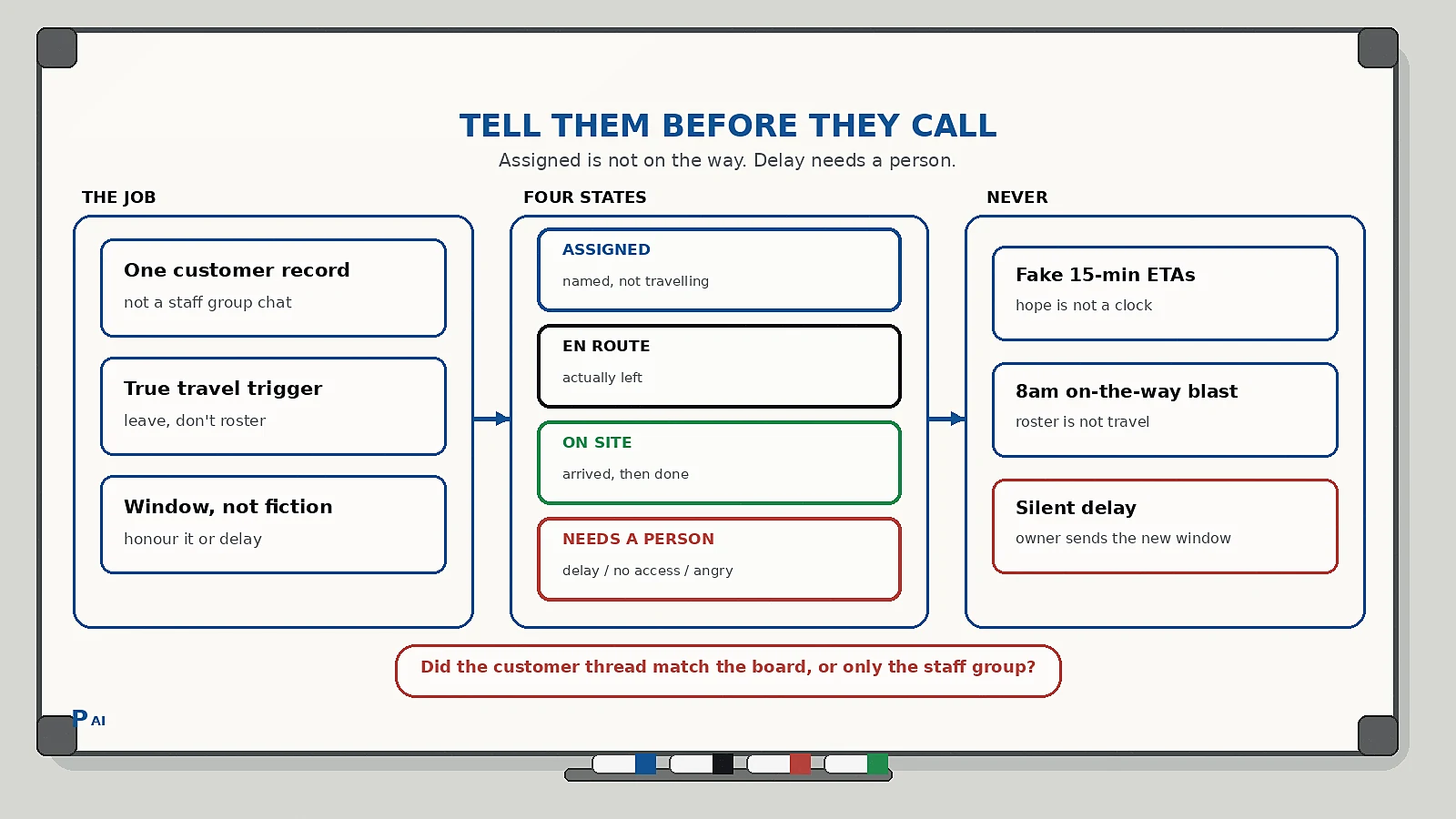
Keep a visible state on the job record, in the customer WhatsApp thread, and on any board the dispatcher reads. If the person sending the message cannot see the state before they tap send, the workflow is decorative.
| State | Meaning | What the customer gets |
|---|---|---|
| Assigned | Visit confirmed, technician named, not yet travelling | Optional short "you are on today's list" — no fake clock |
| En route | Technician has actually left for this job | "On the way" with a window, not a made-up minute count |
| On site | Arrived and work started, or finished | Arrived note, then a done note when the job is closed |
| Needs a person | Delay, no access, extra parts, safety, anger | Named owner replies; bot stops promising times |
Two rules keep it honest:
- Assigned is not En route. A name on the board is not travel. Do not send "we are 20 minutes away" from the assignment click.
- Only a named owner moves a record to Needs a person. The bot never invents a new time, never argues about traffic, and never goes quiet on a slipped window.
This is the same discipline as a human-in-the-loop AI workflow: automation handles the timing of true states; a person owns the judgement when the state is no longer true.
What each customer message should contain
One job. One thread. No essay, no live-map theatre unless you actually have a reliable ETA source the customer can use.
Include:
- The customer's name, your business name, and which job this is ("AC service, afternoon window").
- The current state in plain language: assigned, on the way, arrived, delayed, done.
- A usable window ("between 2 and 3") rather than a fake countdown, unless a real system gives you an ETA you will honour.
- One easy reply: "I am not home" / "Need to reschedule" / "There is a problem."
- Who is coming, if that name will actually walk in. Do not rotate the name after you sent it.
A useful reply set is short:
- I am here / on my way in
- I am not home
- There is a problem
If they choose I am not home, that is a Needs a person trigger — or a clean reschedule — not a reason to keep driving. If they choose There is a problem, stop the status sequence and treat it like a support triage ticket.
A practical update sequence
Keep the sequence stage-matched. The bot is allowed to speak when the job actually changes. It is not allowed to narrate hope.
- After confirmation, not instead of it. The slot is held. If you still send a morning "you are on today's list," keep it short and do not attach a clock.
- En route only when they leave. The trigger is the technician marking travel — or an equivalent your dispatcher trusts — not the 9am roster.
- Arrived. One line: we are here, this is the job, reply if access is blocked. This is the message that prevents the "I waited, nobody came" complaint when they were in the other room.
- Done. Job closed, what was done in one sentence, any next step that is actually true (invoice, parts order). Do not bolt a review request onto this message. Completion and reviews are different triggers.
- If the window slips. Stop promising. A named owner sends an honest delay: new window or a reschedule offer. Silence is how you train the next "where are you?" call.
What you never do:
- Send "on the way" for every job at 8am.
- Invent "15 minutes" because it sounds professional.
- Use a staff group as the customer's source of truth.
- Keep driving after "I am not home."
- Stack five status pings on a one-hour job.
If they never arrived, that is not a status problem. That is the no-show recovery path — after the slot is actually empty.
The honest-delay rule
The reason owners skip status updates is the fear of being wrong in writing. The workflow does not hide from that. It makes the delay visible on purpose.
- A slipped window is cheaper as a WhatsApp line than as a customer waiting at the door.
- "We are delayed; the new window is 4 to 5, or we can move you" is an operating message. "Sorry for the inconvenience" with no new time is not.
- Do not let the bot pick a new time. The bot can offer the owner's two real options. The owner confirms which one is true.
Status updates improve when the board is true, not when the copy is warmer. This is the same lesson as customer context handoffs: the next person, and the customer, should see the same job.
Implementation checklist
Use this as a one-week build, not a field-service transformation.
- Confirm every booked visit has one customer record, one WhatsApp number, and one job id. Merge duplicate chats first.
- Add the four states above to the record the dispatcher actually looks at.
- Decide the only legal triggers for En route and On site. If technicians will not mark travel, do not automate the lie.
- Write four short templates: assigned (optional), en route, arrived, done. Keep variables to name, job, window, and technician name.
- Write one delay template that a person sends: new window or reschedule. No bot-authored minute counts.
- Define stop events: customer not home, problem, abuse, cancelled, completed, moved to no-show recovery.
- Name the human who owns Needs a person each day. A shared inbox with no owner is how a delay becomes a one-star.
- Review open Assigned jobs that never became En route. That is a dispatch problem, not a missing template.
Common pitfalls
- Narrating the roster. Telling everyone they are "next" at 9am trains them to ignore you by noon.
- GPS theatre. A live map you cannot defend is worse than a honest two-hour window.
- Group chat as the system of record. Photos of completed work that never reach the customer are internal theatre.
- Confirmation and status in one blast. Confirmation holds the slot. Status reports movement. Mixing them is how unconfirmed jobs get "on the way" messages.
- Bolting on the review. Ask for the review after the done state is real, in its own flow, not as a fifth paragraph under "we have arrived."
FAQ
What should a technician on-the-way WhatsApp say?
Name, job, that they have actually left, a window you will honour, and an easy "I am not home." Do not invent a minute count unless a system you trust produced it.
When should I send job status updates on WhatsApp?
When the job state changes: assigned (optional), en route, arrived, done, or delayed. Not on a timer that ignores whether anyone left the workshop.
Should I automate "on the way" messages?
Yes, when the trigger is real travel or a dispatcher-trusted equivalent, and you stop on "not home," delay, or a problem. Automation fails when it fires from the morning roster.
How is this different from a visit confirmation?
Confirmation answers whether the slot is real before you dispatch. Status answers where the job is after you dispatch. Run confirmation first; status second.
What if the technician is late?
Stop the automatic clock. A named person sends a new window or a reschedule. A bot that keeps saying "almost there" is how you lose the next booking.
Practical takeaway
"Where are you?" is a visibility problem, not a manners problem. Put the job on one record, speak only when the state is true, give a window instead of a fiction, and hand delay to a named person. The businesses that get fewer chase-up calls are not the ones with the fanciest map. They are the ones whose customer thread matches the board.
If you want help designing a job status flow that sits on the same record as confirmation, no-show recovery, and review requests, talk to Pratap AI Innovations.
