
WhatsApp Review Request Workflow: Turn Finished Work Into Google Reviews
A Google review is not a favour you beg for at the end of every job. It is a trigger you place in the flow: ask while the outcome is fresh, route the happy customer to Google, send at most one gentle reminder, and let a person catch the unhappy or unsafe reply before any coupon is attached.
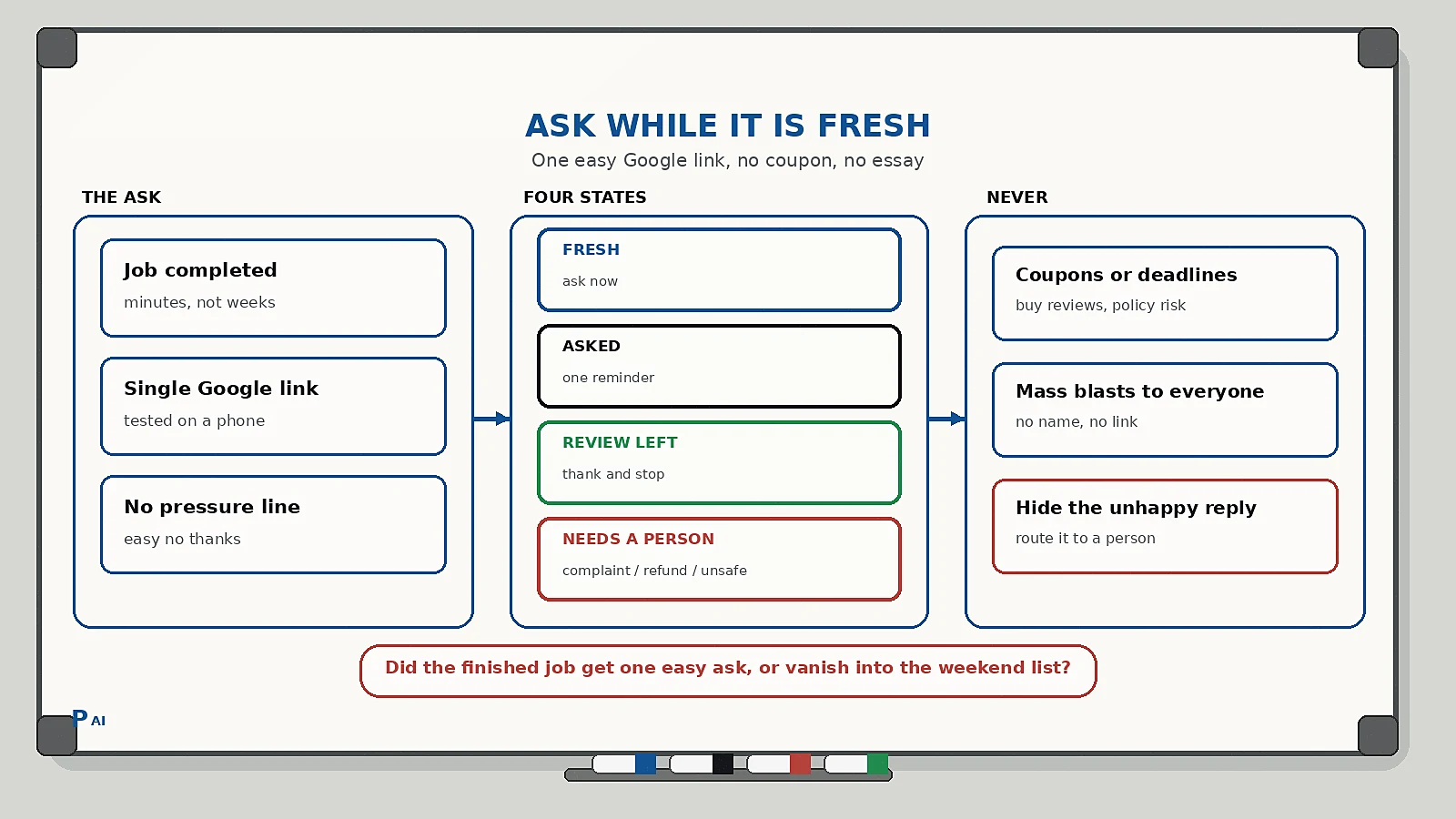
Quick answer
A WhatsApp review request workflow is the operating rule that turns finished work into Google reviews without feeling like begging. Do four things: ask while the outcome is fresh, send the happy customer a single short link to Google, send at most one gentle reminder, and let a named person catch the unhappy or unsafe reply - before any coupon, discount, or incentive is pasted on.
Most small businesses do not collect few reviews because their work is bad. They collect few reviews because the ask is a weekend chore with a television in front of it. The problem is not customer satisfaction. It is that the request has no trigger, no owner, and no stop rule.
Why reviews dry up even when the work is good
You finish a job, the customer is happy, you both move on. Three weeks later you send a mass "please review us" blast. It reads as a generic ask, lands on a distracted phone, and does nothing.
What usually goes wrong:
- The ask happens days late, when the good feeling has faded.
- The request has no link or a buried login "view my review."
- You ask everyone the same way, including the customer who complained and got a refund.
- You pressurise with coupons and countdowns, which trains people to trade reviews for discounts.
- Nobody owns the honest negative reply, so you are afraid to ask at all.
This sits downstream of the same customer record you already use for lead capture and context handoffs. The review request belongs on that same record so you never ask someone who already cancelled, returned, or escalated.
The four states of a review request
Keep a visible state on the customer record, in the WhatsApp thread, and in any dashboard the team reads. If the person sending the message cannot see the state before they tap send, the workflow is decorative.
| State | Meaning | What happens next |
|---|---|---|
| Fresh | Job done, good outcome, no complaint | Send the single Google link now |
| Asked | Link sent, no reply yet | One gentle reminder inside a week |
| Review left | Google link opened and review posted | Thank them, stop every ping |
| Needs a person | Complaint, refund, unsafe, VIP | Named owner replies; no link, no coupon |
Two rules keep it honest:
- Asked is not Review left. Until you can see the review on Google (or the thread link opens), do not claim it.
- Only a named owner moves a record to Needs a person. The bot never discounts, never argues, and never quietly skips the unhappy customer.
This is the same discipline as a human-in-the-loop AI workflow: automation handles the timing, a person owns the judgement.
When to ask
Ask while the outcome is fresh and while the positive emotion is still attached to you. That is minutes to hours after the completed task - not the next month.
- A clinic or salon: right after the appointment, while they are checking out.
- A technician or site visit: the same day as the completed visit, not after the invoice.
- An ecommerce delivery: shortly after delivery confirmation, not the day they ordered.
- A service business: immediately after sign-off on the delivered deliverable.
If you use a visit or delivery confirmation flow, put the review ask after the completed state, never before it. The review is about the finished job; asking before the job is done is how you collect an invoice, not a testimonial.
What the request message should contain
One ask. One link. No essay, no coupon, no countdown. If you add a discount and a deadline, you are buying reviews, and Google treats coordinated incentives as a policy risk.
Include:
- The customer's name and your business name.
- Why you are asking only them: "you just had a visit with us."
- A direct, working link to your Google review page - someone else's profile or a buried "manage reviews" screen breaks the whole step.
- A plain sentence that the review is not compulsory: "no pressure - only if you want to."
- How to say no or report a problem, so the unhappy customer goes to you instead of to a one-star post with no context.
A useful reply set is short, not a wall of text:
- Leave a Google review
- I had a concern
- No thanks
If they choose No thanks, mark the record Asked and stop. If they choose I had a concern, that is a Needs a person trigger, not a reason to send the coupon.
A practical request sequence
Keep the sequence short and stage-matched. The bot is allowed to ask once and remind once. That is it.
- Minutes after completion, not next month. Send the single WhatsApp with the Google link while the outcome is fresh. This is the highest-yield step and the one most businesses skip by waiting.
- If they say thanks or ask a question. Answer naturally; do not force the review. Wait for an actual positive signal, then send the link.
- If they stay silent. One gentle reminder inside a week: "no pressure - the link is still open if you want to leave one." Never repeat it a third time.
- If they open the link and post. Confirm and thank them publicly. Mark the record Review left. Stop every ping.
- If they pick a concern. Stop the sequence. A named owner replies. Capture the complaint on the CRM so it becomes the next improvement, not a defensively hidden review.
What you never do:
- Ask everyone the same way, including refunds and complaints.
- Offer coupons, discounts, or entry to a prize draw in the request. Google's guidelines treat coordinated incentives as manipulation.
- Blast a mass "please review us" to the whole list with no name, no link, and no context.
- Claim a review was left because a link was opened. Opened is not posted.
- Ignore the unhappy reply. The one-star you never see is the one that hurts most in local search.
The honest-negative rule
The reason most owners are afraid to automate review requests is the fear of the one-star. The workflow does not hide from that fear - it routes it.
- A customer who had a real problem is taken to a person immediately, not to a review form.
- A complaint is a free, direct signal about what breaks. Treat it like a support triage ticket, fix the cause, and the public review problem mostly takes care of itself.
- Do not respond "we reached out privately"; say what you actually did: "we corrected the installation and refunded the difference."
Reviews improve when the bad experience stops happening, not when the ask becomes more aggressive. This is the same lesson as CRM data quality: a clean, honest record beats a polished one that drifts.
Implementation checklist
Use this as a one-week build, not a reviews transformation.
- Confirm every completed customer has one record and one WhatsApp number. If two chats exist, merge them first.
- Generate your real Google review link and test it on a phone before anyone sends it.
- Add the four states above to the record the team actually looks at.
- Write three short templates: first ask, gentle reminder, thank-you. Keep variables to name, business, and the link.
- Define the stop events: review posted, "no thanks," "I had a concern," refund, complaint, abuse.
- Name the human who owns Needs a person each day. A shared inbox with no owner is how honest criticism turns into a silent one-star.
- Review open Asked records weekly. If the same customer is still unasked after a fortnight, that is a people problem, not a missing template.
Common pitfalls
- Ordering the ask, not the ask. Sending the invoice is not asking for a review. They are different triggers on the same record.
- A buried login. If your link opens "log in to view reviews" instead of the customer's own review box, you lose them at the last step.
- Asking before completion. Never put the request on the confirmation flow; put it on the completed state.
- Coupons as the hook. Incentives buy reviews, train discount-seeking, and violate Google's policy. The hook is a finished job and a single easy link.
- Fear as an excuse. You do not need to ask everyone. You need everyone who had a good outcome a single, easy, non-pressured way to say so.
FAQ
What is the best way to ask for a Google review on WhatsApp?
Send one short message with the customer's name, why you are asking (a just-completed job), a direct working link to your Google review page, and an easy "no thanks." Keep it to a single ask and at most one gentle reminder. Do not add coupons or deadlines.
Should I automate review requests?
Yes, when the trigger is a completed outcome and you stop on the signals (posted, no thanks, concern). Automation makes the ask consistent and fast. It fails when it becomes a mass blast with no state and no stop rule.
How is a review request different from an invoice reminder?
An invoice reminder asks for money; a review request asks for a testimonial. Asking for both in one message dilutes both. Keep them as separate triggers on the same customer record, like the invoice payment reminder flow.
How many review reminders should I send?
One initial ask and one gentle follow-up. More than that reads as pressure and trains customers to avoid you entirely.
Is it okay to offer a discount for a review?
Google's guidelines treat coordinated incentives for reviews as manipulation and it damages trust. Ask for the review on the merit of the finished work. If you want more reviews, fix the reasons people stay silent.
Practical takeaway
Reviews are a trigger problem, not a begging problem. Place one easy ask right after the good outcome, route the happy customer to Google with a working link, remind them once, and route the unhappy customer to a named person before any incentive is attached. The businesses that collect reviews consistently are not the pushiest - they are the ones who ask at the right moment, once, without an essay around it.
If you want help designing a review request flow that sits on the same customer record as confirmation, invoicing, and support, talk to Pratap AI Innovations.
